
Why Are 3D Models So Big?
Your GLB file is only 10MB, but on your phone it eats 200MB of VRAM and crashes. Let's take a closer look at what's really going on.
Your Model Is Secretly Gaining Weight
You export a GLB file. 10MB. Feels fine. You upload it to your phone, open it up—white screen, lag, even a full crash.
Works fine on desktop, but on mobile it explodes. It's not your code. 3D models have a counterintuitive property: they are not the same size on disk as they are in VRAM.
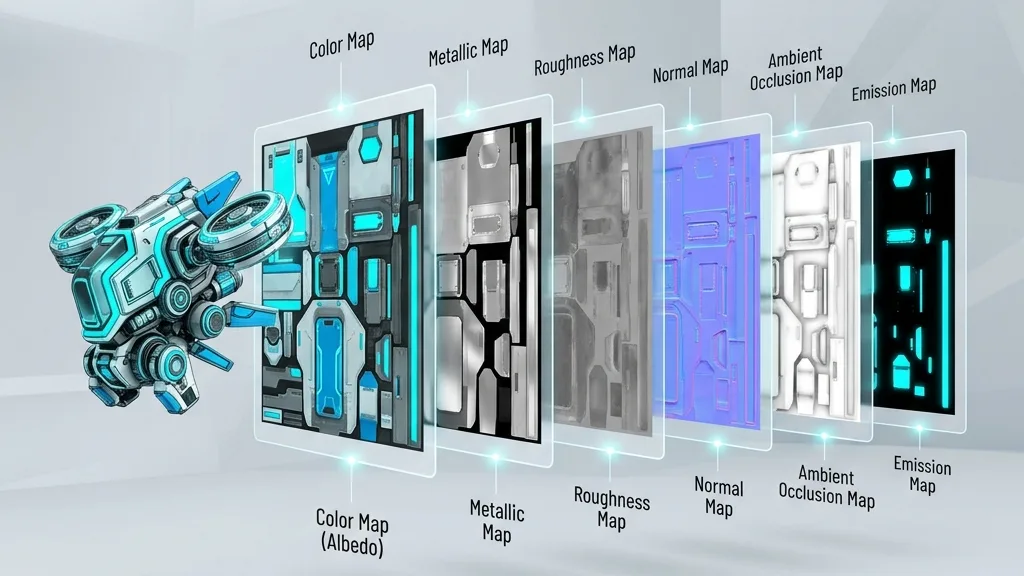
A JPEG on disk might be 200KB. But the GPU doesn't know JPEG—it only knows raw pixels. So before being uploaded to VRAM, that image gets fully decompressed. A 2048x2048 texture unpacked takes about 22MB of VRAM. If you use six texture maps (albedo, normal, roughness, metallic, AO, emissive), one material eats 132MB.
A phone might have only 2–4GB of total VRAM. One model's textures just took 3–6% of that. What about 10 models in a scene?
Let's Break It Down: Where Does the Size Go?
A typical GLB model is made of three main parts: vertex data, texture maps, and metadata plus animations.
Take a real PBR model:
| Component | What's inside | Typical share | Notes |
|---|---|---|---|
| Texture maps | albedo, normal, roughness, metallic, AO, etc. | 70–85% | Almost always the heavyweight |
| Vertex data | position, normal, UV, tangent, color | 10–20% | Depends on model complexity |
| Animation data | bones, skinning, keyframes | 0–15% | Only if animated |
| Other | material definitions, scene structure, cameras | < 2% | Negligible |
Texture maps account for about 80% of the size. You often think you need to optimize vertices, but the real hog is textures.
"Small on Disk" ≠ "Small in VRAM"
This is probably the most critical point for understanding 3D performance.
PNG and JPEG are designed for network transmission—small on disk, fast to download. But the GPU can't use them directly; they must be fully decompressed into raw pixels. The math:
VRAM usage = width * height * 4 bytes (RGBA) * 1.333 (with mipmaps)
A 4096x4096 RGBA texture:
| Metric | Value |
|---|---|
| PNG file size | ~8MB |
| JPEG file size | ~1.5MB |
| VRAM usage (with mipmaps) | ~87MB |
A 1.5MB JPEG becomes 87MB in VRAM.
What are mipmaps? The GPU generates a chain of progressively smaller versions of the texture—from full size down to 1x1 pixel, each level half the previous. This makes distant objects render faster and cleaner, but costs about 33% extra VRAM. Almost all 3D applications use mipmaps, so this overhead is standard.
So PNG/JPEG are like vacuum compression bags for travel—small and compact to carry, but you have to fully inflate everything when you arrive. Downloads are faster, but VRAM isn't saved at all.

What Happens When You Run Out of VRAM
You won't get a polite "out of VRAM" dialog box. It's worse:
- Mobile: white screen, or the OS kills the tab
- VR headsets: frame drops. Dropping frames in VR isn't just "kind of laggy"—it causes motion sickness
- Desktop: textures flicker, degrade, rendering slows down
A developer on Reddit was building a WebXR gallery and loaded 60 stereo images onto a Quest. It worked fine at first, then became increasingly unstable until it crashed. He spent days debugging his code, only to realize he'd never seriously thought about VRAM—he was just feeding JPEGs to the GPU.
Two Paths of Compression
3D model compression mainly goes in two directions:
Vertex compression — store vertex coordinates, normals, UVs, and other geometry data in a more compact way. For example, swapping 32-bit floats for 16-bit integers (called quantization). Leading solutions: Draco, MeshOpt, KHR_mesh_quantization.
Texture compression — keep textures compressed even while in VRAM. The GPU decodes individual pixels on the fly when sampling, with almost no performance cost. Leading solution: KTX2 + Basis Universal.
| Vertex compression | Texture compression | |
|---|---|---|
| What it reduces | Geometry data | Textures |
| Typical effect | Reduce file size 50–90% | Disk size 50–70%, VRAM 75% |
| Lossy? | Yes, precision drops | Yes, quality drops |
| Best for | Vertex-heavy models | Almost all PBR models |
| See more | Part 2 | Parts 3 & 4 |
A common mistake: using Draco to compress vertices and thinking you're done. But textures make up 80% of the model's size. Cut vertices in half, and you might only shrink the whole thing by 10%. You need to manage both.
No One-Size-Fits-All Method
This is the core idea of the entire series:
Different platforms, different devices, different use cases—each needs a different compression strategy.
| Scenario | Primary bottleneck | Focus |
|---|---|---|
| Desktop web display | Download speed | File size |
| Mobile browser | VRAM | Texture compression |
| VR headset | VRAM + frame rate | Texture compression + vertex simplification |
| WeChat Mini Program | Package size + compatibility | Lightweight solution (MeshOpt) |
| Large scene | VRAM + draw calls | Full compression + LOD |
Each upcoming article won't just say "use X and you're done". Instead, it'll explain: what scenarios X is good for, when it can actually hurt, and what to use instead.
Next Steps
This one laid out the problem. Next up—let's get hands-on with the three tools of vertex compression: quantization, MeshOpt, and Draco.